A customer places an order on your website. The payment goes through, but your ERP hasn't received the order yet. Your inventory still shows the old stock level, and your CRM doesn't have the latest customer activity.
Now someone from your team has to move that information manually. Again.
The problem usually isn't the software. It's that the systems aren't talking to each other. Each one is probably doing exactly what it was bought to do -- the gap is between them, and every one of those gaps becomes a person's job to fill.
That's what API integration (https://www.codegrin.com/services/software-development-services) actually solves. But it's worth being upfront: it doesn't mean connecting everything to everything. That's where many integration projects go wrong before they even start.
#What API Integration Actually Is
An API -- Application Programming Interface -- lets two systems exchange information without a person copying it over by hand.
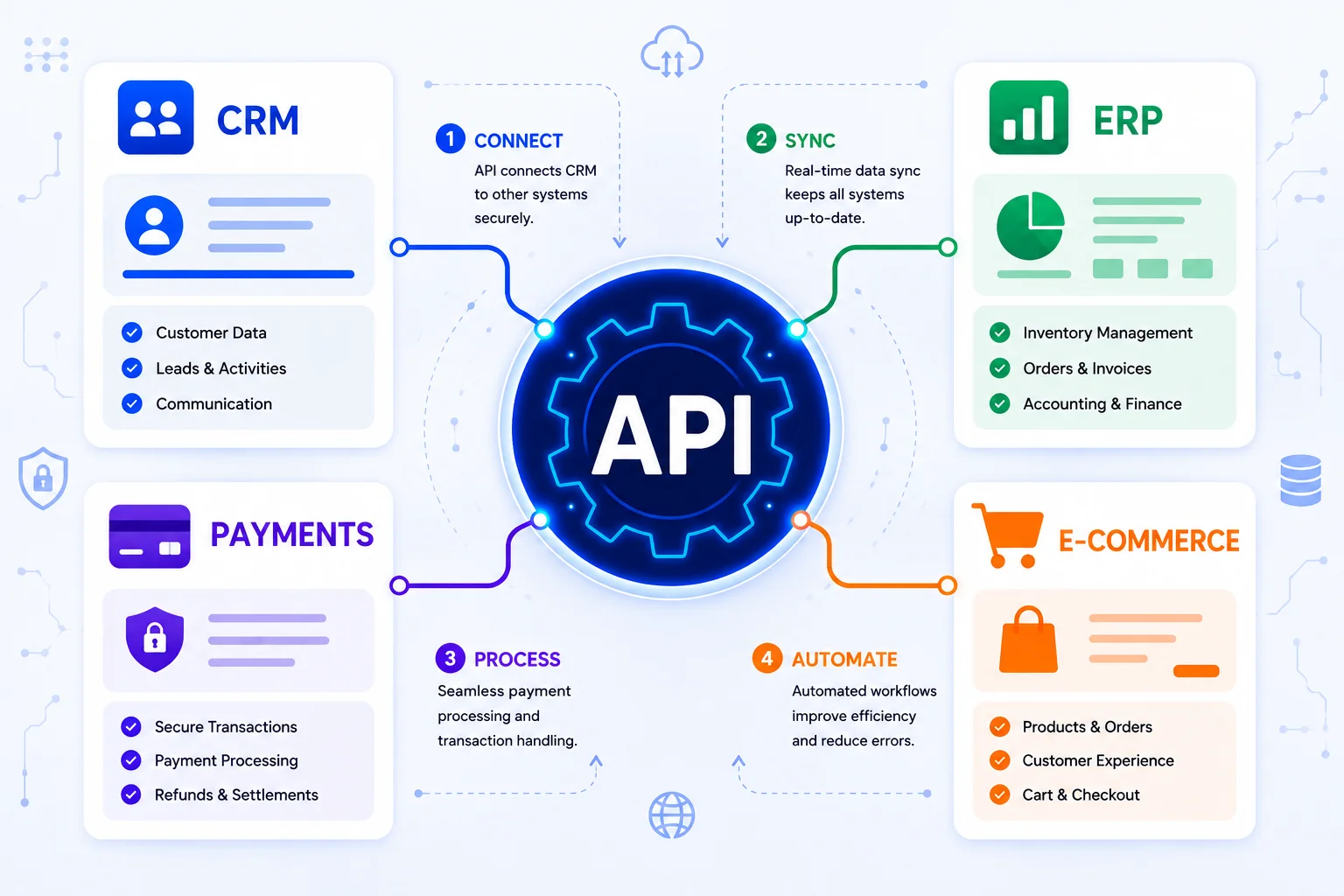
Think of it as a bridge: e-commerce platform to API to ERP.
The same bridge can connect CRM and ERP, e-commerce and inventory, payment gateways and websites, CRM and customer portals, and ERP and accounting systems.
API integration isn't about replacing your tools. It's about making the ones you already have stop working in isolation.
#Where This Breaks Down for Growing Businesses
Nobody sets out to build a disconnected mess. It happens gradually -- an e-commerce platform first, then a CRM, then an ERP, then a payment gateway. Each one solved a real problem when it was added, but nobody planned for all of them to communicate with each other.
The cost shows up in small, repeated tasks: entering the same customer information twice, manually moving orders between systems, updating inventory by hand across platforms, checking payment status one transaction at a time, and stitching together reports from separate exports.
None of these looks like a crisis on its own. Multiply them across hundreds of orders a month, and you're spending real time on work that shouldn't need to exist.
#How the Connection Actually Works
A single connected order might move like this: customer places order, e-commerce platform records it, payment gateway confirms it, ERP receives order data, inventory adjusts, and CRM logs the activity.
Here's where many businesses get it wrong: they assume more connections are automatically better. They aren't. The right approach connects the systems actually creating manual work -- not everything a system is technically capable of sharing.
#Integration and Automation Aren't the Same Thing
These two terms often get used interchangeably, but they shouldn't be.
Integration is the connection -- systems being able to exchange data. Automation is what you build once that connection exists, triggering actions without a person starting the process.
Sending order data from your storefront to your ERP is integration. Having that order automatically update inventory, verify payment status (https://www.codegrin.com/services/mobile-ecommerce-solutions), notify the warehouse, and email the customer -- that's automation running on top of it.
You need the first before you can have the second. Businesses sometimes invest in automation tools before solving the integration underneath, which is exactly why the automation doesn't always work as expected.
#Does Your Business Actually Need This?
Here's the honest filter: if your team spends real time each week manually moving information between systems that should already know about each other, you may have an integration problem. If they don't, you probably don't need one yet -- no matter how many tools you're running.
Signs worth taking seriously: someone re-enters the same customer or order details into more than one system, orders get moved to fulfillment by hand, inventory counts drift out of sync between platforms, payment status gets checked manually instead of updating automatically, and monthly reports require pulling data from several places and combining them.
The question that actually narrows this down: where is information getting stuck first? Start there -- not with "which systems could theoretically be connected."
#What to Get Right Before You Integrate Anything
Connecting two systems is never just a technical plug-in job. Treating it that way is a common reason integration projects become more complicated and expensive than expected.
Before building anything, decide how data will move between systems, how systems will authenticate with each other, what happens when a request fails partway through, and which system is the source of truth when two of them disagree.
Third-party APIs also change over time -- an integration that works cleanly at launch can need updates later when a platform changes its API. Ongoing monitoring should be part of the plan, not an afterthought. For simple, well-documented connections, an existing connector may be enough. For custom pricing logic or non-standard workflows, a purpose-built integration is usually the better option.
#Start With the Problem, Not the API List
The integration projects that actually work don't start with "which APIs can we connect?" They start with a specific business problem.
Maybe employees are re-entering the same customer data several times a day. Maybe orders are sitting unfulfilled because inventory isn't synchronized. Or the finance team spends hours combining exports from different systems every month.
Once the problem is specific, the right connection becomes much easier to define. Chasing full integration across every tool in the stack before identifying the actual bottleneck is how projects become unnecessarily complicated.
Codegrin Technologies (https://www.codegrin.com/services/business-software-solutions) works across API and backend development, CRM and ERP development, Shopify development, and business process automation -- connecting the systems that are actually creating manual work.
#Frequently Asked Questions
#Ready to Connect Your Business Systems?
If your team is still moving customer, order, payment, or inventory data between platforms by hand, it may be time to look at what's happening behind the scenes.
The right integration connects the systems you already use into a workflow that fits your business. Talk to the Codegrin (https://www.codegrin.com/contact) team about your integration requirements.


